Abstract
In an effort to understand the current landscape of security in the professional sector, I conducted research into the practices and technologies in use by small businesses in Wisconsin. These businesses face critical challenges in protecting against the growing threat of cyber attacks targeted at businesses their size.
Over the past couple of months I have spoken with over 30 small business owners in Wisconsin to understand what the problems and solutions in Madison look like today. I spoke with these owners regarding what tools and technologies they currently use, what issues or threats they are experiencing, their outlook on if they feel their business could be a target, and how much they are spending on protecting their businesses.
The purpose of this report is to spread awareness in the small business community, and help business owners make sense of complex topics that can be daunting and hard to understand. That being said, if any of the following information doesn’t make sense, or if you would like more information, please feel free to reach out!
The following sections include the most common attack methodologies in use today, what solutions businesses need and are using, as well as my own attempt to address these increasing threats.
Security Threats Impacting Small Businesses
Over the past five years, small businesses have seen a dramatic uptick in cyber attacks targeted their way. In a study conducted by Coalition, 79% of all small businesses contacted reported they have experienced some type of cyber attack in the past five years.
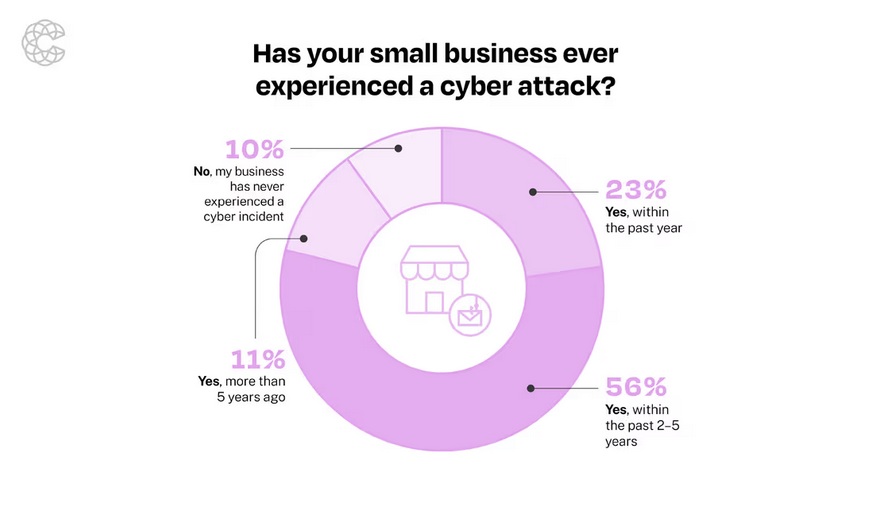
Malicious attackers realize small businesses don’t have the necessary protection in place they need, and are now using AI and automation to mass attack smaller targets. While the number of businesses I talked to that have dealt with a cyber attack in the past was about 54%, this is still a shocking percentage and makes a clear case there needs to be a change.
I was pleased to hear that 86% of the businesses I talked to had some sort of cyber protection in place. The most common tools were antivirus, data backup software, MFA, a password manager, and firewalls. While all of the previously mentioned tools are great, many businesses I spoke to had one or two of these. In order to be fully protected, a business needs to have all of the above in place and it all needs to work seamlessly together. We will touch more on what tools businesses should be using in the next section.
We will now wrap up this section by looking at the most common attacks small businesses are facing.
Phishing - Type of cyber attack that uses email, SMS, or social media to trick users into providing private information, such as passwords or personally identifiable information.
Malware - Malware stands for malicious software and is a piece of software that does something malicious to the computer it is running on. Common examples include collecting private data, or encrypting data so it can’t be accessed.
Ransomware - Ransomware is a type of malware that encrypts files on a computer, locks them away, and demands payment in order to regain access.
Website Hacks - This refers to any attack on your website that allows an attacker to gain illegitimate access, steal data, and disrupt services.
Man-in-the-Middle - Type of cyberattack where a malicious actor eavesdrops on an exchange between your computer and the web application you are accessing. They are then able to view, collect, and possibly alter your data.
While this list is not exhaustive, these are the key attack methods that show up time and time again. Unfortunately these attacks, while commonly known, still continue to work especially among small businesses. I have come to understand over the past couple of months that the key issue is not difficulty in defending against these attacks, but rather lack of awareness. The goal of this report and specifically the next section is to explain what tools you can use to protect your data, now that you are aware of these attacks.
Solutions for Small Businesses
Based on the above attacks and what I have heard small businesses are doing to protect themselves, I have determined a number of key structures and softwares small businesses need. There is simply no “one software fits all” for protecting your business, but using a number of tools conjunctively can give you a robust and enterprise-like level of protection.
Local Network - Every business, no matter how small, needs a secure local network. This includes things like secure WiFi, network segmentation, firewalls, intrusion detection and prevention, and network logs. Using the modem and router given to you by your internet service provider is a big no-no for businesses. (These providers often also charge you a small monthly fee for using their modem and router. This can be avoided by buying your own.) These products are often underpowered, outdated, and have limited functionality. They also get limited updates, meaning there is most likely a known flaw in your current router that an attacker could use to gain access to your network. The solution for this is an advanced router, a hardware or software firewall, intrusion prevention software, etc.
Antivirus Software - Antivirus software regularly scans the files on your computer, and compares them to known malicious files. When it finds a malicious file, it isolates it and alerts you of its presence. Both Windows and Mac come with built in antivirus software, however there are more powerful and advanced options on the market.
Web/Phishing Protection - With so much of our work being done in a browser today, web protection is a critical piece of the security puzzle most managed service providers overlook. There are many security based browsers, like firefox or brave, that companies can use. However, there are also more advanced tools that run in whatever browser you want to use, like Chrome. These tools can detect and respond to phishing and identity attacks in real time by inspecting the pages you visit, detecting malicious content, and notifying you instantly. In my opinion, this is one of the most important points in this document.
Data Backups - Every business needs to have some sort of data backup. Some prefer just backing up their essential files and data, where others want full fledged computer backups for each of the companies’ computers. Whatever the case may be, small businesses can utilize the cloud for cheap, secure, and reliable backups. Some may argue backing up your data to the cloud can expose it to certain risks like the cloud going down during a critical event. While that is the case, the cost effectiveness of the cloud simply beats having your own dedicated server in the office that you have to buy, upgrade, manage, monitor, etc.
Password Manager - Having a password manager is one of the easiest and cheapest ways to secure your business. Employees commonly share passwords, write them on sticky notes, and re-use them. A password manager allows you to store all passwords in one secure app, generate new passwords as needed, and share passwords securely with other employees.
MFA - Multi-factor authentication is the process of providing two or more verification methods to login or access something. A small business should be using MFA to log into everything, period. There are three different categories of MFA, something you know like a password or pin, something you have like a phone or key, and something you are like a fingerprint or face scan. For small businesses I recommend using an MFA app like Microsoft Authenticator. Other common methods like getting a code via text or email are vulnerable to common attack techniques like phishing and man-in-the-middle (discussed above) and shouldn’t be used for business.
Next Steps
When talking to small businesses, the same frustrations kept coming up over and over. Business owners complained about the complexity, cost, and unwillingness to support their small firm as key frustrations they had with existing providers in the market. These frustrations are well understood not only here in Wisconsin, but all over the US. Existing managed service providers typically don’t target small businesses under the 20-25 employee mark. Their services are too complex and therefore too costly for smaller operations with a limited number of employees and limited infrastructure. Similarly, with the rise of the cloud and SaaS applications, small businesses don’t need robust, fully managed services protecting their business like they did before.
Therefore, I have decided to form my own operation, NetworkDefender Security. NetworkDefender is here for the smaller businesses that make Wisconsin and the entire US so great. We operate on a lean model, using limited physical hardware and the cloud to give you a simple, yet secure security experience. By operating in this manner, we limit how much it costs for our business to operate. We then pass these savings onto you, charging you less than what existing providers on the market could even imagine.
While NetworkDefender is not fully operational yet, we would love to connect again with the businesses who inspired us. If you have any questions regarding anything in this report, or would like some free help with the security of your business please reach out via our contact form on the website or my email, nick@networkdefendersecurity.com. Let’s make the small business world more secure!